

Contract Status
- Active / Inactive An active contract refers to a contract that is live and operational. The platform’s automated billing cycle generates invoices based on the contract’s defined terms and billing period. Invoices for active contracts will appear in the Invoices section. You also have the option to deactivate a contract, which will suspend billing automation, and no further invoices will be issued. Contracts with future start dates are labeled as “Inactive” and will automatically transition to active status once the start date is reached.
- Terminated The contract will conclude on the specified end date. Upon termination, no additional invoices will be issued. Terminated contracts cannot be duplicated or turned into Active again.
Contract Edit
Use edit for contract that only started and no invoice had been approved. When to use: when there is a mistake or some wrong pricing definition and no invoices has been approved or issued to customers What to expect The system will delete and replace the contract and the invoices with new ones from the given start date.Contract Revision
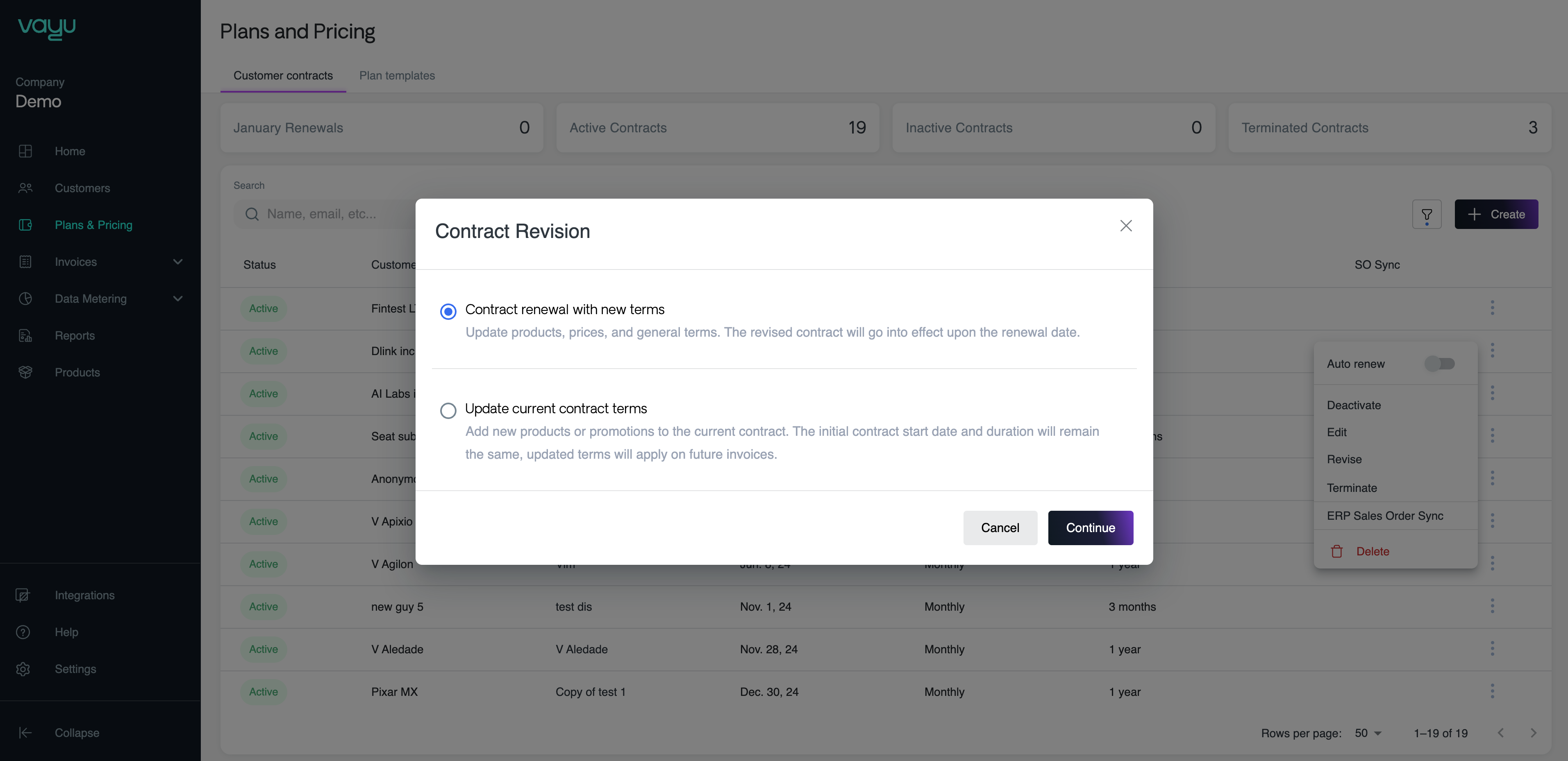
Revision allows you to edit the commercial terms of a contract and is applicable for the following use cases: Renewal with new terms Renewal of contract for a new period with updated pricing terms. Update of the current contract Update contract terms and commercial details, including additional products, pricing, and discounts. You can modify the contract terms retroactively or schedule updates for a future date. Invoices will be issued based on the updated terms. When to use update contract terms when the contract is process ‘live’ and ‘active’ however, there are new pricing / products that needs to be updated and added to the current contract. What to expect- System will Terminate the old contract immediately and will start a new version based on the initial start date but with the new terms.
- System will re-generate invoices for the selected period. Invoices which are on ‘Draft’ and ‘In review’ will be deleted and re generated according to the updated terms.
- Invoices that had already been approved under the old contract will remain as is - in cases of duplication or irrelevant invoice can be either deleted or tag as ‘Cancelled’
Delete a Contract
This will allow you to delete a contract and its related invoices all together. This function is immediate and final - once deleted, a contract or invoice cannot be restored. When to use When the contract is false and the commercial terms are outdated. Delete the contract and create a new one instead. What to expect- System will delete the contract and remove it from the platform
- The deleted contract cannot be restored
- All related invoices will be deleted and cannot be restored
Overview
Use contract phases to create agreements where the terms of payment change throughout the life of the contract. This allows you to structure contracts with different pricing, products, or billing terms across multiple time periods.Creating a phase
To add a phase to a contract:- Navigate to Customers
- Select the customer and go to the Contract page
- Click the + Add Phase button on the right side of the page
- In the phase creation window:
- Define the start date for the new phase
- Add a label to identify the phase
- Click Go to plan builder > to configure the phase’s pricing and products
Use cases
Contract phases are useful for:- Tiered pricing rollouts - Start with introductory pricing and transition to standard rates
- Pilot to production - Begin with a limited pilot phase before full deployment
- Seasonal pricing - Adjust pricing based on seasonal demand or usage patterns
- Graduated commitments - Increase minimum commitments as the customer relationship matures
- Product expansion - Add new products or services at specific milestones
Managing phases
Each phase operates as a distinct pricing period within the same contract. When a phase’s start date is reached, the system automatically applies the new terms and generates invoices according to the phase’s configuration. You can view and manage all phases from the Phases tab on the contract overview page.Video tutorial
For a complete walkthrough of creating contract phases, see this tutorial velow:Inflationary Uplift
Inflationary Uplift allows Vayu to automatically increase subscription pricing over time based on predefined uplift rules. Instead of manually updating pricing for renewals or annual increases, Vayu automatically creates updated pricing phases when an uplift takes effect. This helps maintain pricing continuity across long-term contracts while reducing manual operational work for finance and revenue teams.Enable Auto Price Uplift
To enable Inflationary Uplift, enter your contract- Create or open a contract.
- Next, add a subscription product.
- On the right-hand sidebar, look at under Pricing Settings.
- Under Auto Price Uplift, toggle the setting on.