

What’s Synced
Vayu enables you to sync customers, sales orders, and invoices to NetSuite:- Customers - Create and update customer records in NetSuite from Vayu or ingest existing customer records from NetSuite into Vayu. (The sync respects key NetSuite attributes like subsidiary and account configuration.)
- Sales Orders* - Automatically generate Sales Orders in NetSuite based on usage, subscriptions, or events tracked in Vayu. This pulls Sales Orders from NetSuite for reconciliation and reporting in Vayu.
- Invoices - Push invoice data from Vayu and pull from NetSuite:
- Push invoices from Vayu to NetSuite as part of your billing cycle.
- Pull invoice data from NetSuite for reporting or reconciliation in Vayu.
You can now sync Vayu invoices as Sales Orders in NetSuite, including data such as the PO number. This includes a sync status display to follow the process. Go up to the Ellipse menu (●●●), then select Sync. On the Sync submenu, select Sync Invoice as Sales Order.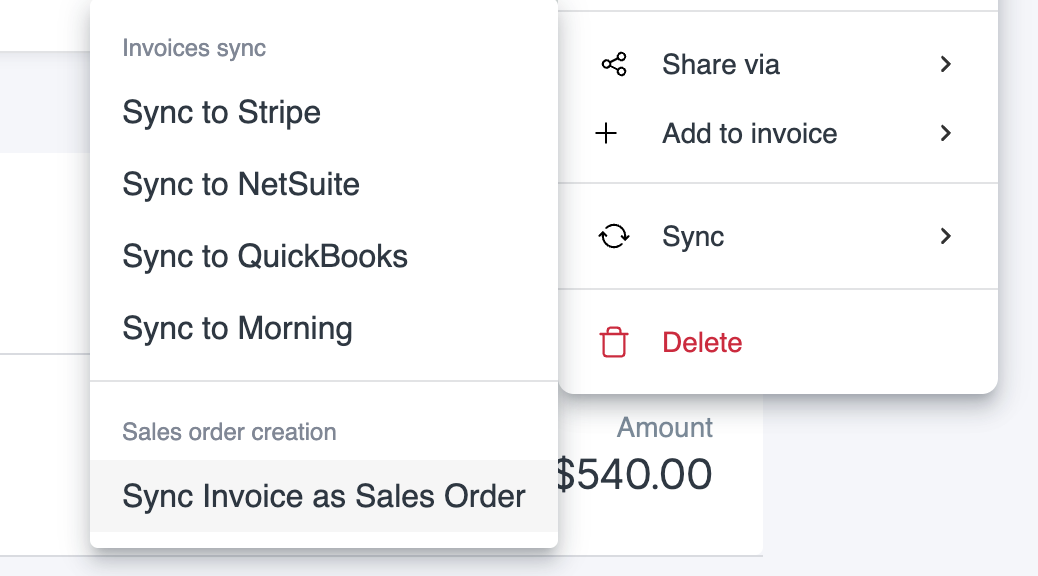
NetSuite Attributes & Setup
To enable precise syncing, Vayu uses NetSuite attributes defined at the client/account level, including subsidiaries, accounts receivable, and product ERP mappings.- Subsidiaries – Ensures transactions are correctly tagged to the appropriate legal entity in NetSuite.
- Accounts Receivable - Sync aligns with the customer’s receivable account setup in NetSuite, ensuring accurate GL posting.
- Product ERP Mappings - Products and pricing in Vayu are matched to NetSuite items using ERP codes, classifications, and other identifiers.
Configuration Notes
- Vayu supports both push and pull mechanisms via secure API.
- Attribute mapping and field-level rules are configurable based on your NetSuite implementation.
- Sync can be scheduled or triggered in real-time, depending on your workflow needs.
Capabilities
To enable precise syncing, Vayu uses NetSuite attributes defined at the client/account level, including:- Subsidiaries- Ensures transactions are correctly tagged to the appropriate legal entity in NetSuite.
- Accounts Receivable - Sync aligns with the customer’s receivable account setup in NetSuite, ensuring accurate GL posting.
- Product ERP Mappings - Products and pricing in Vayu are matched to NetSuite items using ERP codes, classifications, and other identifiers.
Operations
Overall, these are the operations that Vayu’s NetSuite integration supports:- Push/Pull — Across several categories and their attributes, data can be pushed from Vayu to NetSuite, or pulled from NetSuite to Vayu
- Create/Update — Users can create new records in Vayu that will be pushed to NetSuite
- Reconciliation —Mismatches are noted and displayed to be fixed
- Scheduled Sync — Attributes are periodically updated from Vayu
Prerequisites & Permissions
You will need the following to get started:- NetSuite account
- Vayu account
- Permissions and Admin support
Connection & Setup
To launch initial setup and integrations, please contact the Vayu support team.Configurations
Set up configurations by clicking on NetSuite on the integration page. A panel with various settings will open to the right side of the page: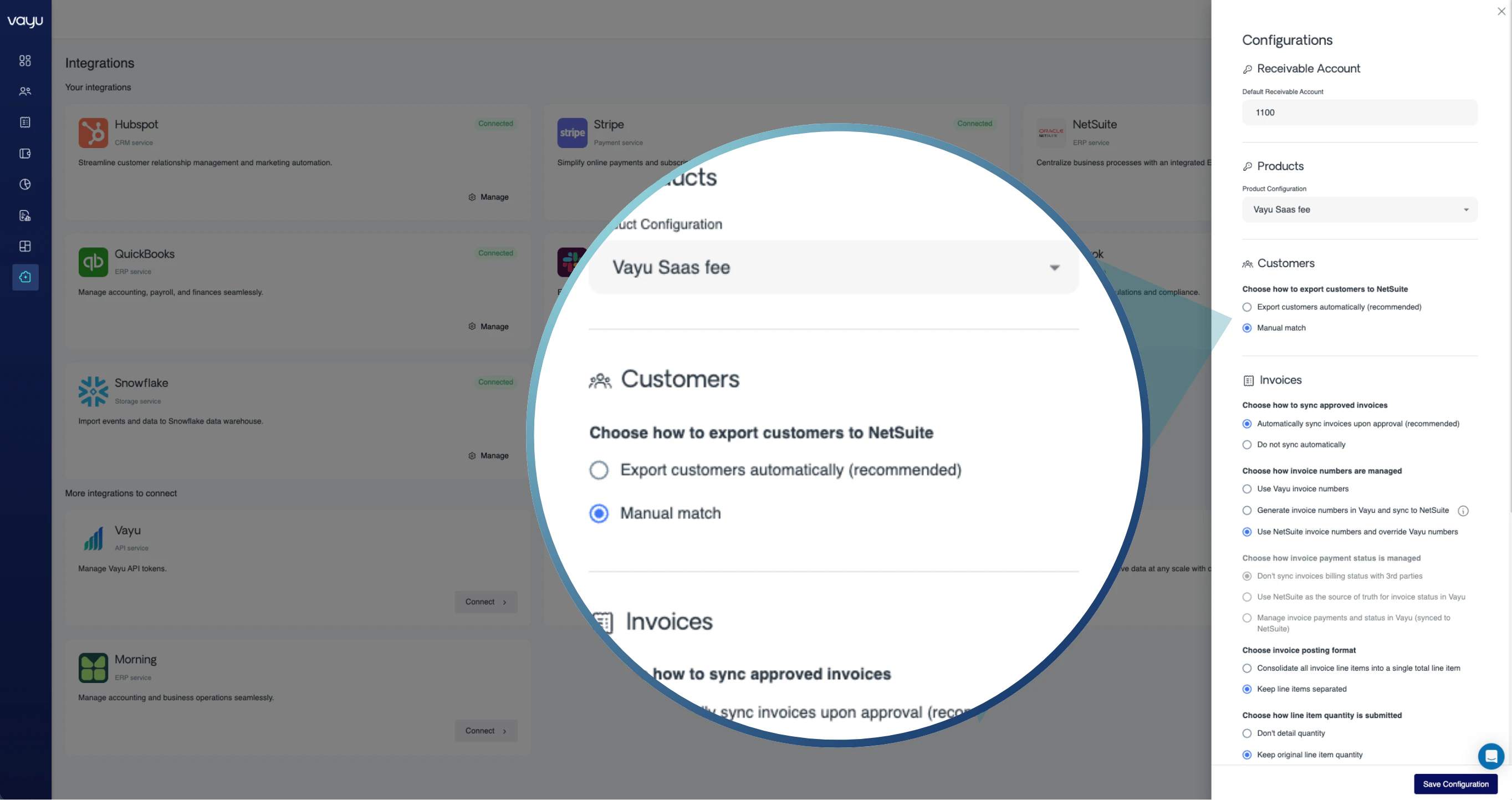
Products
Choose from a dropdown which product you are configuring. For each product, you will be able to configure attributes separately.Customers
Here, choose if you want your customer lists to automatically export to your NetSuite account, or if you want to maintain full control and go with manual matching. We recommend turning on automatic export by selecting ⦿ Export customers automatically (recommended).Invoices
There are two configurations for invoices. First, decide if you want automatic syncing once invoices are approved. Upon integration, Vayu aggregates metered events and applies pricing rules (fixed, usage-based, or hybrid). The platform generates draft invoices automatically, visible under the customer’s Invoices tab: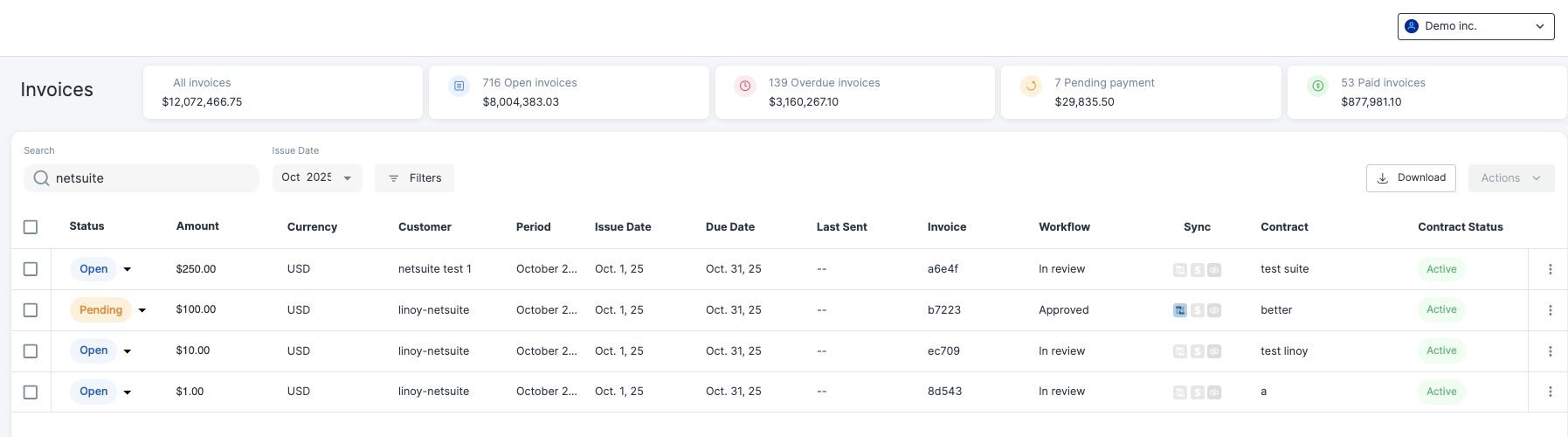
While NetSuite warns that its next automatic number generation will then follow the higher of the number it generated or the one manually entered, this should not be an issue as the Allow Override setting will let Vayu automatically input its own numbers.

Credit Memos
Finally, choose whether or not you want to automatically sync credit memos when you create a new credit ledger.Field Mappings & Attribution
How Contracts Sync
When a deal is marked Closed–Won in a CRM (e.g., Salesforce or HubSpot), Vayu automatically creates the customer and contract record. Contract details—start/end dates, product mix, payment provider, and pricing tiers—are created in Vayu for finance team to review and activate. The integration ensures that each contract’s commercial terms are reflected in NetSuite sales orders and invoices.Approval Workflows
Every invoice has an approval stage before it is synced to NetSuite. Users with proper permissions can modify line items, discounts, quantities, and approve/reject invoices. Once approved, invoices are automatically pushed to NetSuite, updating the Invoice Activity Log with timestamps for:- “Written to NetSuite”
- “Approved”
- “Paid”
Reconciliation
How Data Flows Back into ERP/CRM
NetSuite updates (payment status, AR changes, credit memos) are pulled into Vayu for real-time visibility. These updates refresh dashboards, contract summaries, and invoice activity views.Logs and Activity Tracking
Each integration maintains an Activity Log showing:- When an invoice or order was created, synced, or modified.
- When payments or credits were applied in NetSuite.
- Any sync or validation errors encountered.
- The log is searchable and filterable by customer, object type, or date.
Troubleshooting
Common Issues and Fixes
NetSuite Tax Handling
When connected to NetSuite, Vayu supports flexible tax handling that aligns with NetSuite’s configuration and reporting requirements. You can control how tax is calculated and synced between systems:- NetSuite-managed tax: Use NetSuite as the source of truth for tax rates, codes, and jurisdiction logic. Vayu aligns invoice data with NetSuite’s configuration during sync.
- Vayu-applied tax: Apply tax within Vayu at the invoice or line-item level, then sync finalized invoices to NetSuite.
- Aligned tax syncing: Maintain consistency between systems by ensuring tax structure, rates, and mappings match NetSuite expectations.