> ## Documentation Index
> Fetch the complete documentation index at: https://guide.withvayu.com/llms.txt
> Use this file to discover all available pages before exploring further.
# PDF Extraction
PDF extraction uses AI to automatically parse contract documents and extract structured data into Vayu. This feature streamlines the process of creating customers and contracts from existing PDF agreements.
## Overview
The PDF extraction feature allows you to upload contract PDFs and automatically extract key information including:
* Customer details and contact information
* Contract terms and dates
* Pricing and product information
* Plans and commitments
## How to use PDF extraction
### Extracting contract data
To extract data from a contract PDF:
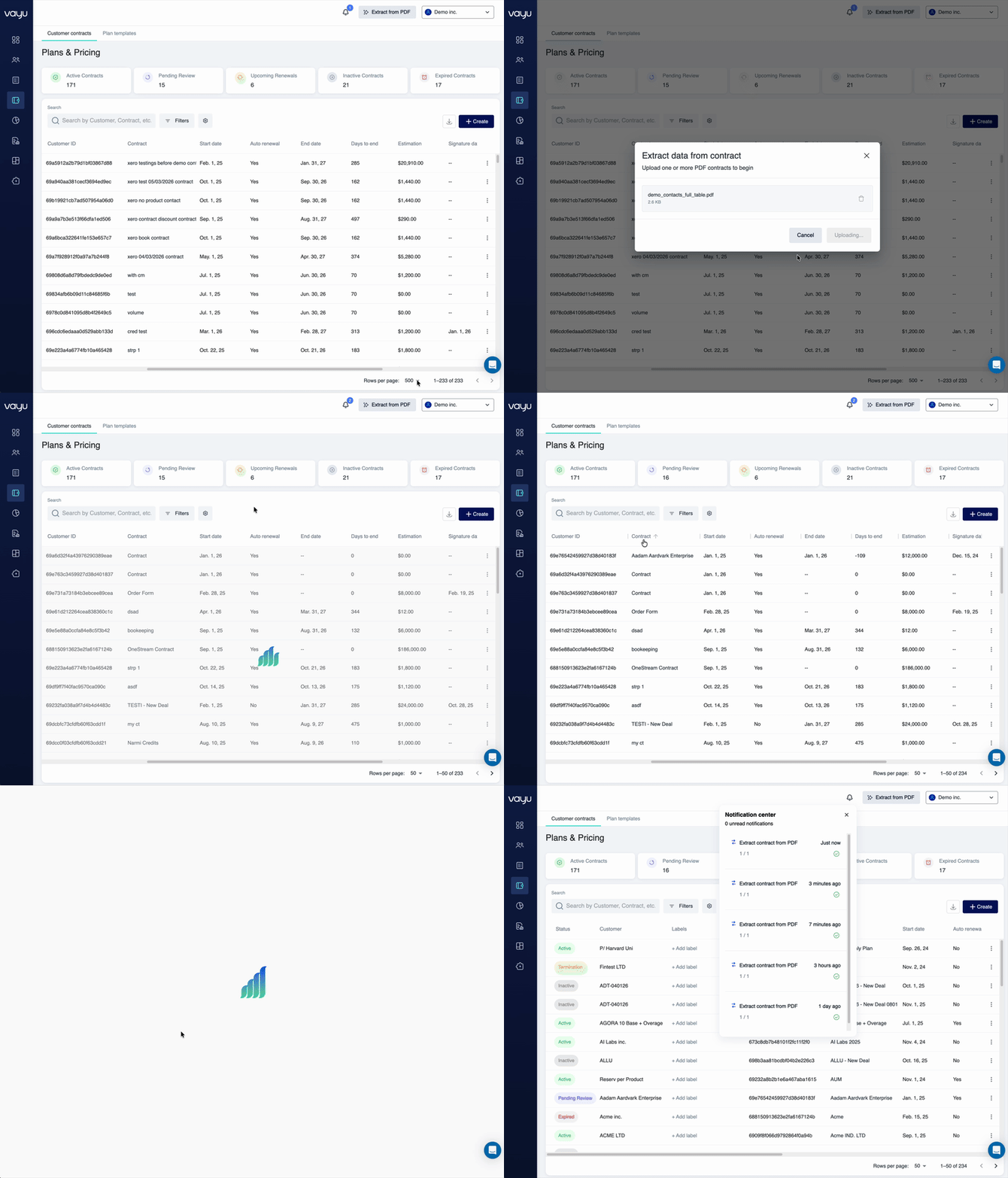
1. Navigate to the contract creation workflow
2. Click **Extract from PDF** in the upper-right corner
 3. In the modal window, drag and drop your contract PDF or click **Upload file**
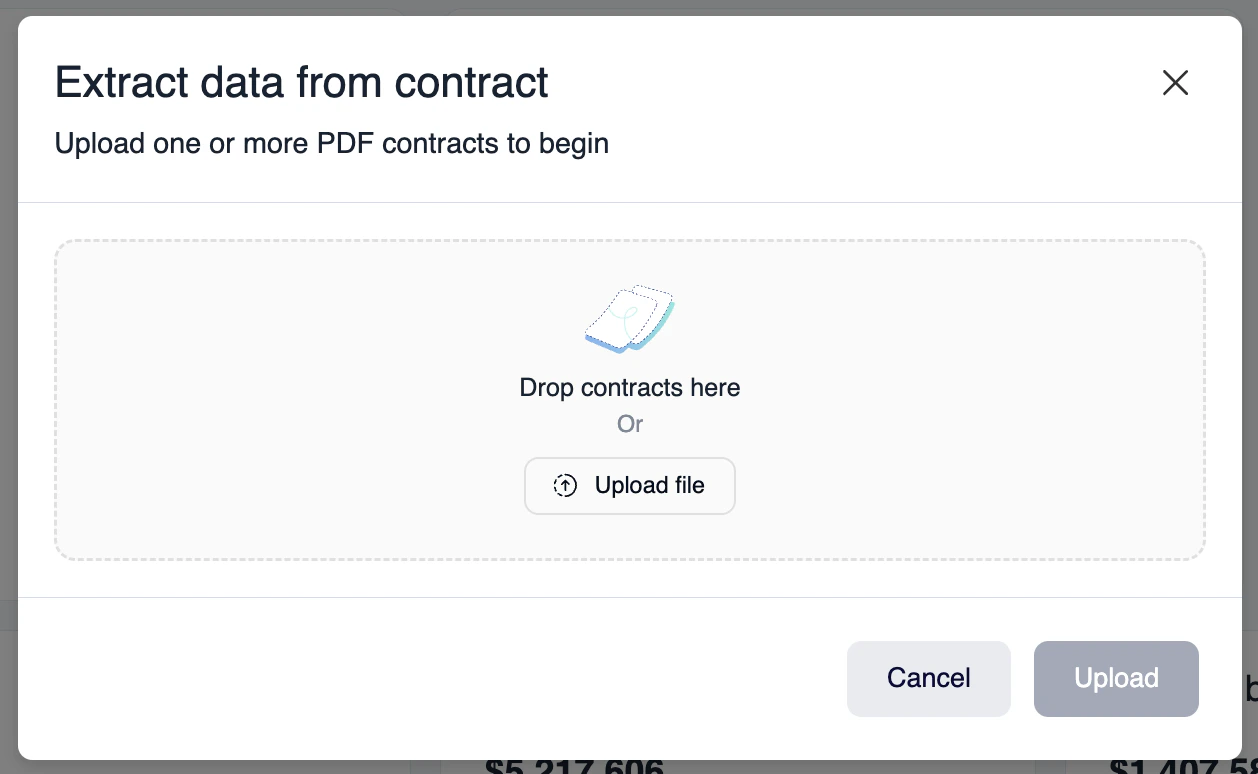 4. Upload the document to begin extraction
5. Review the extracted data and make any necessary adjustments
6. Save the contract to complete the process
4. Upload the document to begin extraction
5. Review the extracted data and make any necessary adjustments
6. Save the contract to complete the process
 ### Creating customers from PDFs
When extracting contract data, the system can automatically:
* Create new customer records if they don't exist
* Match existing customers based on name or identifier
* Populate customer fields with extracted information
* Link the contract to the appropriate customer
### Supported data fields
The AI extraction process can identify and populate:
**Customer information:**
* Company name
* Contact details
* Billing address
* Customer identifiers
**Contract details:**
* Contract start and end dates
* Billing cycle and frequency
* Payment terms
* Renewal conditions
**Pricing and products:**
* Product line items
* Fixed fees and usage-based pricing
* Commitments and minimums
* Discounts and promotions
## Best practices
* Ensure PDFs are text-based (not scanned images) for best results
* Review extracted data before saving to verify accuracy
* Use consistent contract templates to improve extraction accuracy
* Update customer information if the AI matches to an existing record
## Preferences and settings
You can configure PDF extraction preferences to:
* Set default values for missing fields
* Define customer matching rules
* Specify required fields for validation
* Customize extraction behavior
For more information on this feature, see the [changelog entry](https://guide.withvayu.com/documentation/change-log/changelog#extract-from-makes-pdf-data-uploads-easy).
### Creating customers from PDFs
When extracting contract data, the system can automatically:
* Create new customer records if they don't exist
* Match existing customers based on name or identifier
* Populate customer fields with extracted information
* Link the contract to the appropriate customer
### Supported data fields
The AI extraction process can identify and populate:
**Customer information:**
* Company name
* Contact details
* Billing address
* Customer identifiers
**Contract details:**
* Contract start and end dates
* Billing cycle and frequency
* Payment terms
* Renewal conditions
**Pricing and products:**
* Product line items
* Fixed fees and usage-based pricing
* Commitments and minimums
* Discounts and promotions
## Best practices
* Ensure PDFs are text-based (not scanned images) for best results
* Review extracted data before saving to verify accuracy
* Use consistent contract templates to improve extraction accuracy
* Update customer information if the AI matches to an existing record
## Preferences and settings
You can configure PDF extraction preferences to:
* Set default values for missing fields
* Define customer matching rules
* Specify required fields for validation
* Customize extraction behavior
For more information on this feature, see the [changelog entry](https://guide.withvayu.com/documentation/change-log/changelog#extract-from-makes-pdf-data-uploads-easy).