> ## Documentation Index
> Fetch the complete documentation index at: https://guide.withvayu.com/llms.txt
> Use this file to discover all available pages before exploring further.
# Slack
 Vayu supports a native Slack integration that allows customers to connect their Slack workspace, configure notification delivery, and interact with selected workflows directly from Slack.
## Overview
The Slack integration is used to connect a customer’s Slack workspace to Vayu so that Vayu can:
* send direct messages for approval workflows
* send direct notifications for specific events
* send automated notifications to a configured Slack channel
* receive and process interactive Slack actions
This integration is OAuth-based and requires a workspace admin or authorized user to connect Slack to Vayu.
## Capabilities
Once connected, the Slack integration supports the following capabilities:
* **Workspace connection via OAuth**: Users can authorize Vayu to access their Slack workspace through the Slack OAuth flow.
* **Channel configuration for notifications**: Users can select and save a Slack channel where automated notifications should be delivered.
Vayu supports a native Slack integration that allows customers to connect their Slack workspace, configure notification delivery, and interact with selected workflows directly from Slack.
## Overview
The Slack integration is used to connect a customer’s Slack workspace to Vayu so that Vayu can:
* send direct messages for approval workflows
* send direct notifications for specific events
* send automated notifications to a configured Slack channel
* receive and process interactive Slack actions
This integration is OAuth-based and requires a workspace admin or authorized user to connect Slack to Vayu.
## Capabilities
Once connected, the Slack integration supports the following capabilities:
* **Workspace connection via OAuth**: Users can authorize Vayu to access their Slack workspace through the Slack OAuth flow.
* **Channel configuration for notifications**: Users can select and save a Slack channel where automated notifications should be delivered.
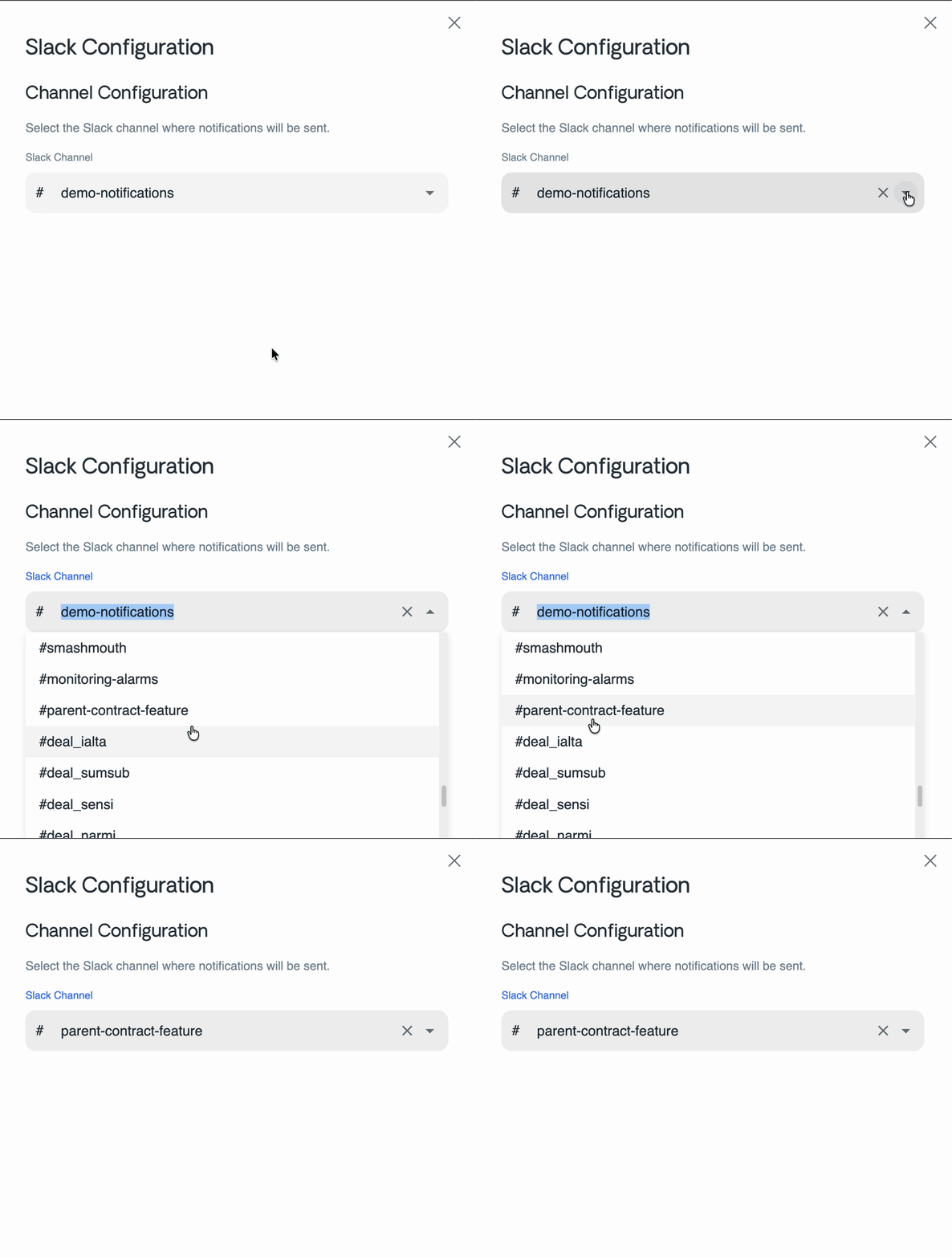 * **User and channel discovery**: Vayu can retrieve Slack users and channels from the connected workspace to support configuration and notification flows.
* **Interactive approvals**\
Vayu can send interactive approval messages in Slack, including an **Approve** action for invoices.
* **Operational notifications**\
Vayu can send direct notifications such as credit note updates, as well as automated channel notifications.
## How it works
The Slack integration consists of several parts across the Vayu platform:
* **API integration endpoints**\
The API exposes endpoints to initiate the Slack connection, handle the OAuth callback, retrieve users and channels, receive Slack events, and trigger Slack notifications.
* **Slack client**\
Vayu uses a dedicated Slack client built on `@slack/web-api` to communicate with Slack using the stored OAuth token.
* **Frontend integration settings**\
The Vayu frontend includes Slack integration settings that allow users to connect Slack, configure a destination channel, and disconnect the integration.
* **Notification delivery pipeline**\
Automated Slack notifications are queued through SNS and delivered by the communications service.
## Supported flows
The Slack integration currently supports the following flows:
1. **Connect Slack workspace**\
A user starts the OAuth flow from the Vayu integrations UI.
2. **Authorize and store credentials**\
Slack redirects back to Vayu, which processes the callback and stores the workspace authentication details.
3. **Configure notification channel**\
A user selects a Slack channel to receive automated notifications. This channel ID is stored in the integration configuration.
4. **Send direct or channel notifications**\
Vayu sends Slack messages either to users directly or to the configured workspace channel, depending on the workflow.
5. **Handle interactive actions**\
When a user clicks an interactive action in Slack, Vayu receives the callback and processes the corresponding business action.
## Interactive actions
The current Slack interaction handling is focused on `block_actions`.
At present, the primary implemented interactive action is:
* `approve_invoice`
When a user selects this action in Slack:
* Vayu updates the invoice status to **Approved**
* the original Slack message is updated to reflect the completed action
## Configuration requirements
The Slack integration depends on the following configuration:
* `API_URL`\
Used to construct the Slack OAuth callback URL.
* `SLACK_SECRETS_ID`\
Used to retrieve the Slack OAuth application secrets.
The configured secret is expected to contain values such as:
* `CLIENT_ID`
* `CLIENT_SECRET`
* `SCOPES`
## Important behavior and limitations
* Automated Slack channel notifications require a saved `channelId` in the integration configuration.
* If no `channelId` is configured, channel-based notification delivery will fail.
* Slack users and channels are only retrieved when the integration is active.
* Current interactive support appears to be limited to specific implemented actions, primarily invoice approval.
## Relevant components
Key implementation areas include:
* `apps/api/src/modules/integrations/integrations.controller.ts`
* `apps/api/src/modules/integrations/integrations-apps/slack/`
* `libs/integration-client/src/slack-client/slack-client.ts`
* `apps/communications/src/apps/slack/slack-emitter/`
* **User and channel discovery**: Vayu can retrieve Slack users and channels from the connected workspace to support configuration and notification flows.
* **Interactive approvals**\
Vayu can send interactive approval messages in Slack, including an **Approve** action for invoices.
* **Operational notifications**\
Vayu can send direct notifications such as credit note updates, as well as automated channel notifications.
## How it works
The Slack integration consists of several parts across the Vayu platform:
* **API integration endpoints**\
The API exposes endpoints to initiate the Slack connection, handle the OAuth callback, retrieve users and channels, receive Slack events, and trigger Slack notifications.
* **Slack client**\
Vayu uses a dedicated Slack client built on `@slack/web-api` to communicate with Slack using the stored OAuth token.
* **Frontend integration settings**\
The Vayu frontend includes Slack integration settings that allow users to connect Slack, configure a destination channel, and disconnect the integration.
* **Notification delivery pipeline**\
Automated Slack notifications are queued through SNS and delivered by the communications service.
## Supported flows
The Slack integration currently supports the following flows:
1. **Connect Slack workspace**\
A user starts the OAuth flow from the Vayu integrations UI.
2. **Authorize and store credentials**\
Slack redirects back to Vayu, which processes the callback and stores the workspace authentication details.
3. **Configure notification channel**\
A user selects a Slack channel to receive automated notifications. This channel ID is stored in the integration configuration.
4. **Send direct or channel notifications**\
Vayu sends Slack messages either to users directly or to the configured workspace channel, depending on the workflow.
5. **Handle interactive actions**\
When a user clicks an interactive action in Slack, Vayu receives the callback and processes the corresponding business action.
## Interactive actions
The current Slack interaction handling is focused on `block_actions`.
At present, the primary implemented interactive action is:
* `approve_invoice`
When a user selects this action in Slack:
* Vayu updates the invoice status to **Approved**
* the original Slack message is updated to reflect the completed action
## Configuration requirements
The Slack integration depends on the following configuration:
* `API_URL`\
Used to construct the Slack OAuth callback URL.
* `SLACK_SECRETS_ID`\
Used to retrieve the Slack OAuth application secrets.
The configured secret is expected to contain values such as:
* `CLIENT_ID`
* `CLIENT_SECRET`
* `SCOPES`
## Important behavior and limitations
* Automated Slack channel notifications require a saved `channelId` in the integration configuration.
* If no `channelId` is configured, channel-based notification delivery will fail.
* Slack users and channels are only retrieved when the integration is active.
* Current interactive support appears to be limited to specific implemented actions, primarily invoice approval.
## Relevant components
Key implementation areas include:
* `apps/api/src/modules/integrations/integrations.controller.ts`
* `apps/api/src/modules/integrations/integrations-apps/slack/`
* `libs/integration-client/src/slack-client/slack-client.ts`
* `apps/communications/src/apps/slack/slack-emitter/`