> ## Documentation Index
> Fetch the complete documentation index at: https://guide.withvayu.com/llms.txt
> Use this file to discover all available pages before exploring further.
# NetSuite
> Vayu–NetSuite Integration
 Vayu specializes in unifying contract and event data into a single revenue management platform. Oracle’s NetSuite platform offers a powerful way for businesses to handle key financial and operational tasks, including accounting and financial management. Integrating the two platforms ensures that your billing and revenue information is fully up to date and aligned at all times, no matter where you’re accessing it.
Vayu integrates smoothly and swiftly with Netsuite, offering robust two-way synchronization for your billing and revenue workflows. Not only do you achieve data consistency across platforms, you can also seamlessly automate critical finance operations.
### **What’s Synced**
Vayu enables you to sync customers, sales orders, and invoices **to NetSuite**:
* **Customers** - Create and update customer records in NetSuite from Vayu or ingest existing customer records from NetSuite into Vayu. (The sync respects key NetSuite attributes like subsidiary and account configuration.)
* **Sales Orders\*** - Automatically generate Sales Orders in NetSuite based on usage, subscriptions, or events tracked in Vayu. This pulls Sales Orders from NetSuite for reconciliation and reporting in Vayu.
* **Invoices** - Push invoice data from Vayu and pull from NetSuite:
* Push invoices from Vayu to NetSuite as part of your billing cycle.
* Pull invoice data from NetSuite for reporting or reconciliation in Vayu.
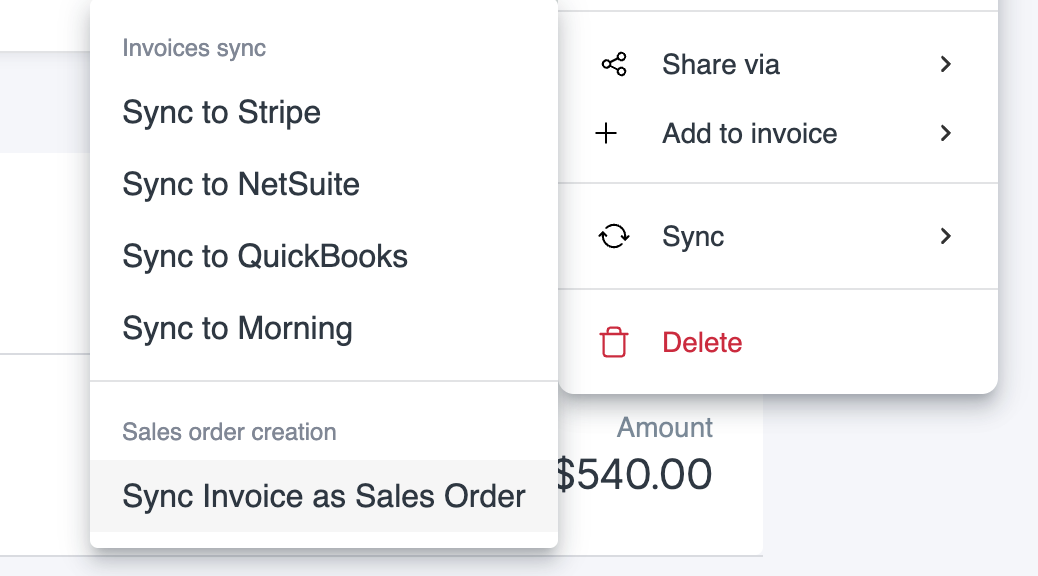
You can now sync Vayu invoices as Sales Orders in NetSuite, including data such as the PO number. This includes a sync status display to follow the process. Go up to the Ellipse menu (●●●), then select **Sync**. On the Sync submenu, select **Sync Invoice as Sales Order**.
Vayu specializes in unifying contract and event data into a single revenue management platform. Oracle’s NetSuite platform offers a powerful way for businesses to handle key financial and operational tasks, including accounting and financial management. Integrating the two platforms ensures that your billing and revenue information is fully up to date and aligned at all times, no matter where you’re accessing it.
Vayu integrates smoothly and swiftly with Netsuite, offering robust two-way synchronization for your billing and revenue workflows. Not only do you achieve data consistency across platforms, you can also seamlessly automate critical finance operations.
### **What’s Synced**
Vayu enables you to sync customers, sales orders, and invoices **to NetSuite**:
* **Customers** - Create and update customer records in NetSuite from Vayu or ingest existing customer records from NetSuite into Vayu. (The sync respects key NetSuite attributes like subsidiary and account configuration.)
* **Sales Orders\*** - Automatically generate Sales Orders in NetSuite based on usage, subscriptions, or events tracked in Vayu. This pulls Sales Orders from NetSuite for reconciliation and reporting in Vayu.
* **Invoices** - Push invoice data from Vayu and pull from NetSuite:
* Push invoices from Vayu to NetSuite as part of your billing cycle.
* Pull invoice data from NetSuite for reporting or reconciliation in Vayu.
You can now sync Vayu invoices as Sales Orders in NetSuite, including data such as the PO number. This includes a sync status display to follow the process. Go up to the Ellipse menu (●●●), then select **Sync**. On the Sync submenu, select **Sync Invoice as Sales Order**.
 ### **NetSuite Attributes & Setup**
To enable precise syncing, Vayu uses NetSuite attributes defined at the **client/account level**, including subsidiaries, accounts receivable, and product ERP mappings.
* **Subsidiaries** – Ensures transactions are correctly tagged to the appropriate legal entity in NetSuite.
* **Accounts Receivable** - Sync aligns with the customer’s receivable account setup in NetSuite, ensuring accurate GL posting.
* **Product ERP Mappings** - Products and pricing in Vayu are matched to NetSuite items using ERP codes, classifications, and other identifiers.
### **Configuration Notes**
* Vayu supports both **push and pull** mechanisms via secure API.
* Attribute mapping and field-level rules are configurable based on your NetSuite implementation.
* Sync can be scheduled or triggered in real-time, depending on your workflow needs.
## Capabilities
To enable precise syncing, Vayu uses NetSuite attributes defined at the client/account level, including:
* **Subsidiaries**- Ensures transactions are correctly tagged to the appropriate legal entity in NetSuite.
* **Accounts Receivable** - Sync aligns with the customer’s receivable account setup in NetSuite, ensuring accurate GL posting.
* **Product ERP Mappings** - Products and pricing in Vayu are matched to NetSuite items using ERP codes, classifications, and other identifiers.
In other words, the Vayu configurations will precisely match and mirror your NetSuite setup, ensuring the smooth flow of data between Vayu and NetSuite and providing the framework for reliable reporting and insights.
### Operations
Overall, these are the operations that Vayu’s NetSuite integration supports:
* **Push/Pull** — Across several categories and their attributes, data can be pushed from Vayu to NetSuite, or pulled from NetSuite to Vayu
* **Create/Update** — Users can create new records in Vayu that will be pushed to NetSuite
* **Reconciliation** —Mismatches are noted and displayed to be fixed
* **Scheduled Sync** — Attributes are periodically updated from Vayu
## Prerequisites & Permissions
You will need the following to get started:
1. NetSuite account
2. Vayu account
3. Permissions and Admin support
## Connection & Setup
To launch initial setup and integrations, please contact the Vayu support team.
## Configurations
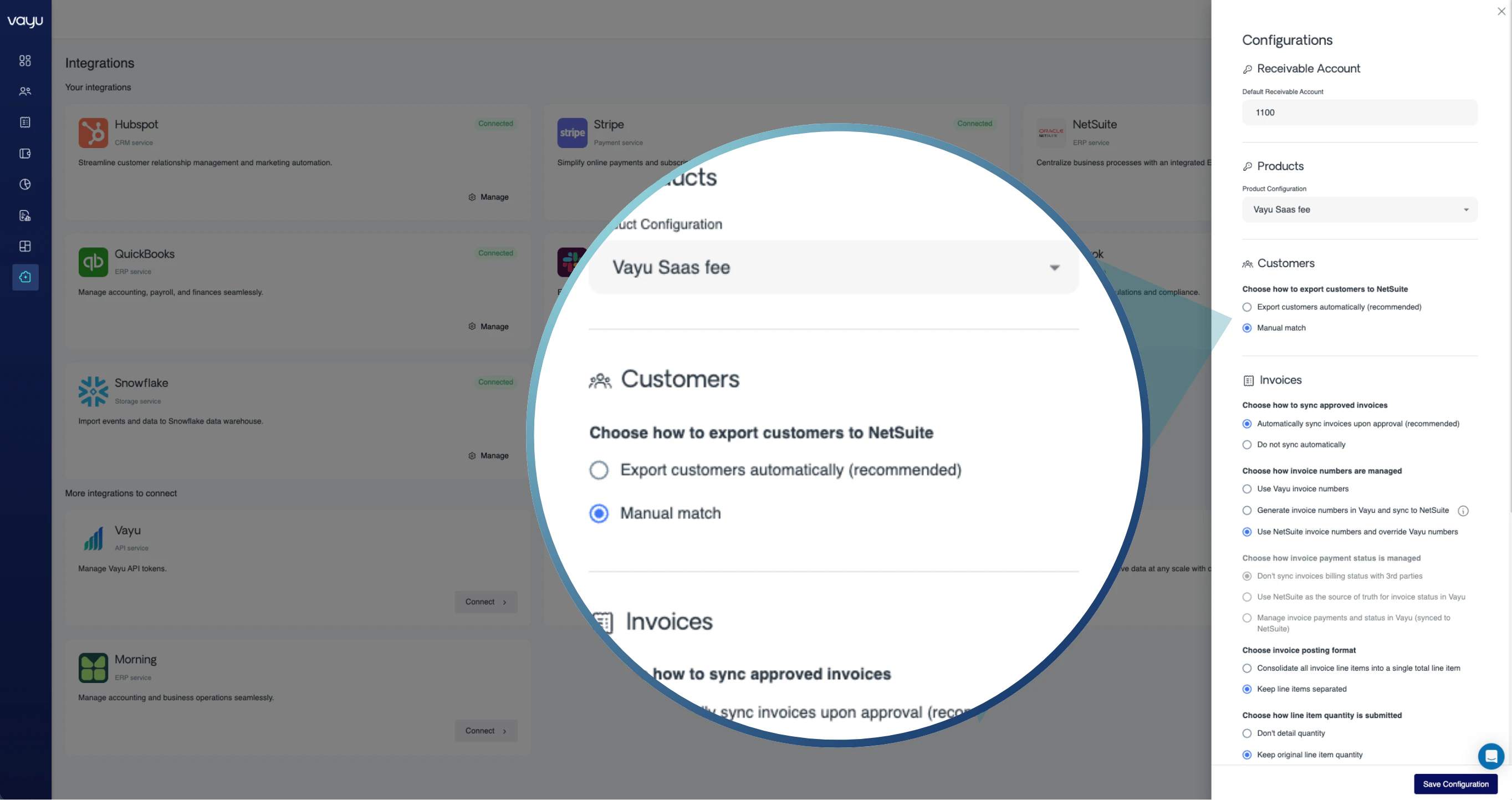
Set up configurations by clicking on NetSuite on the integration page. A panel with various settings will open to the right side of the page:
### **NetSuite Attributes & Setup**
To enable precise syncing, Vayu uses NetSuite attributes defined at the **client/account level**, including subsidiaries, accounts receivable, and product ERP mappings.
* **Subsidiaries** – Ensures transactions are correctly tagged to the appropriate legal entity in NetSuite.
* **Accounts Receivable** - Sync aligns with the customer’s receivable account setup in NetSuite, ensuring accurate GL posting.
* **Product ERP Mappings** - Products and pricing in Vayu are matched to NetSuite items using ERP codes, classifications, and other identifiers.
### **Configuration Notes**
* Vayu supports both **push and pull** mechanisms via secure API.
* Attribute mapping and field-level rules are configurable based on your NetSuite implementation.
* Sync can be scheduled or triggered in real-time, depending on your workflow needs.
## Capabilities
To enable precise syncing, Vayu uses NetSuite attributes defined at the client/account level, including:
* **Subsidiaries**- Ensures transactions are correctly tagged to the appropriate legal entity in NetSuite.
* **Accounts Receivable** - Sync aligns with the customer’s receivable account setup in NetSuite, ensuring accurate GL posting.
* **Product ERP Mappings** - Products and pricing in Vayu are matched to NetSuite items using ERP codes, classifications, and other identifiers.
In other words, the Vayu configurations will precisely match and mirror your NetSuite setup, ensuring the smooth flow of data between Vayu and NetSuite and providing the framework for reliable reporting and insights.
### Operations
Overall, these are the operations that Vayu’s NetSuite integration supports:
* **Push/Pull** — Across several categories and their attributes, data can be pushed from Vayu to NetSuite, or pulled from NetSuite to Vayu
* **Create/Update** — Users can create new records in Vayu that will be pushed to NetSuite
* **Reconciliation** —Mismatches are noted and displayed to be fixed
* **Scheduled Sync** — Attributes are periodically updated from Vayu
## Prerequisites & Permissions
You will need the following to get started:
1. NetSuite account
2. Vayu account
3. Permissions and Admin support
## Connection & Setup
To launch initial setup and integrations, please contact the Vayu support team.
## Configurations
Set up configurations by clicking on NetSuite on the integration page. A panel with various settings will open to the right side of the page:
 ### Products
Choose from a dropdown which product you are configuring. For each product, you will be able to configure attributes separately.
### Customers
Here, choose if you want your customer lists to automatically export to your NetSuite account, or if you want to maintain full control and go with manual matching.
We recommend turning on automatic export by selecting ⦿ **Export customers automatically (recommended)**.
### Invoices
There are two configurations for invoices.
First, decide if you want automatic syncing once invoices are approved.
Upon integration, Vayu aggregates metered events and applies pricing rules (fixed, usage-based, or hybrid). The platform generates draft invoices automatically, visible under the customer’s [**Invoices**](https://guide.withvayu.com/documentation/guides/invoices/real-time-invoice) tab:
###
### Products
Choose from a dropdown which product you are configuring. For each product, you will be able to configure attributes separately.
### Customers
Here, choose if you want your customer lists to automatically export to your NetSuite account, or if you want to maintain full control and go with manual matching.
We recommend turning on automatic export by selecting ⦿ **Export customers automatically (recommended)**.
### Invoices
There are two configurations for invoices.
First, decide if you want automatic syncing once invoices are approved.
Upon integration, Vayu aggregates metered events and applies pricing rules (fixed, usage-based, or hybrid). The platform generates draft invoices automatically, visible under the customer’s [**Invoices**](https://guide.withvayu.com/documentation/guides/invoices/real-time-invoice) tab:
###
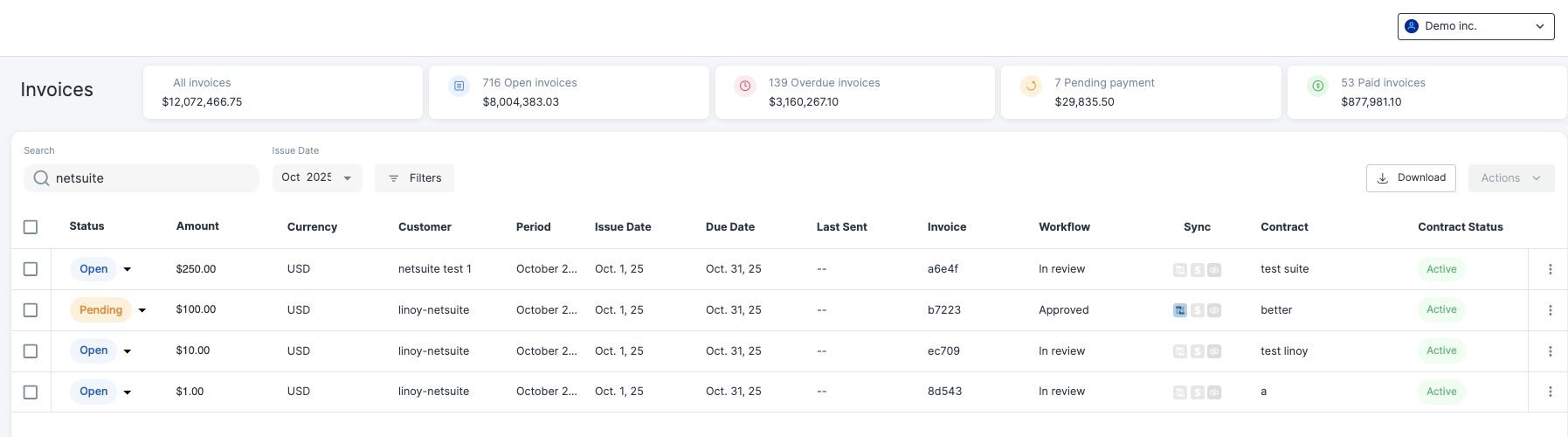 After approval, invoices are pushed to NetSuite where they inherit all GL and subsidiary attributes from Vayu. NetSuite handles downstream accounting and payment status updates, which Vayu can read back for reconciliation.
*Secondly*, choose which invoice number you want to use as your primary, either the auto-generated NetSuite number or override that number with Vayu's invoice number.
To allow Vayu to override the NetSuite number, enter your NetSuite settings. Go to **Setup**, then Company, then **Auto-Generated Numbers**, then **Document Numbers**. Go to the Invoice row and check **Allow Override**, then hit **Save**.
>
>
After approval, invoices are pushed to NetSuite where they inherit all GL and subsidiary attributes from Vayu. NetSuite handles downstream accounting and payment status updates, which Vayu can read back for reconciliation.
*Secondly*, choose which invoice number you want to use as your primary, either the auto-generated NetSuite number or override that number with Vayu's invoice number.
To allow Vayu to override the NetSuite number, enter your NetSuite settings. Go to **Setup**, then Company, then **Auto-Generated Numbers**, then **Document Numbers**. Go to the Invoice row and check **Allow Override**, then hit **Save**.
>
>  >
>
> While [NetSuite warns](https://docs.oracle.com/en/cloud/saas/netsuite/ns-online-help/bridgehead_4340447524.html) that its next automatic number generation will then follow the higher of the number it generated or the one manually entered, this should not be an issue as the Allow Override setting will let Vayu automatically input its own numbers.
### Credit Memos
Finally, choose whether or not you want to automatically sync credit memos when you create a new credit ledger.
## Field Mappings & Attribution
### How Contracts Sync
When a deal is marked *Closed–Won* in a CRM (e.g., Salesforce or HubSpot), Vayu automatically creates the customer and contract record.
Contract details—start/end dates, product mix, payment provider, and pricing tiers—are created in Vayu for finance team to review and activate.
The integration ensures that each contract’s commercial terms are reflected in NetSuite sales orders and invoices.
### Approval Workflows
Every invoice has an approval stage before it is synced to NetSuite. Users with proper permissions can modify line items, discounts, quantities, and approve/reject invoices.
Once approved, invoices are automatically pushed to NetSuite, updating the **Invoice Activity Log** with timestamps for:
* “Written to NetSuite”
* “Approved”
* “Paid”
## Reconciliation
### How Data Flows Back into ERP/CRM
NetSuite updates (payment status, AR changes, credit memos) are pulled into Vayu for real-time visibility.
These updates refresh dashboards, contract summaries, and invoice activity views.
### Logs and Activity Tracking
Each integration maintains an **Activity Log** showing:
* When an invoice or order was created, synced, or modified.
* When payments or credits were applied in NetSuite.
* Any sync or validation errors encountered.
* The log is searchable and filterable by customer, object type, or date.
## Troubleshooting
### Common Issues and Fixes
| Issue | Common Reason | Common Fix |
| ------------------------------------------------ | ---------------------------------------------------- | --------------------------------------------------------------- |
| Invoice or Sales Order not appearing in NetSuite | Missing or incorrect Customer or ERP product mapping | Verify product codes under *Integration → Manage → ERP Mapping* |
| Duplicate customer records | Customer existed in both systems before sync | Merge duplicate records in NetSuite; refresh in Vayu |
| Sync failed with “Permission Denied” | NetSuite role lacks API access | Update NetSuite user role to include API + transaction rights |
| Discrepancy in invoice totals | Currency or rounding mismatch | Confirm both systems use same currency and rounding precision |
## **NetSuite Tax Handling**
When connected to NetSuite, Vayu supports flexible tax handling that aligns with NetSuite’s configuration and reporting requirements.
You can control how tax is calculated and synced between systems:
* **NetSuite-managed tax:** Use NetSuite as the source of truth for tax rates, codes, and jurisdiction logic. Vayu aligns invoice data with NetSuite’s configuration during sync.
* **Vayu-applied tax:** Apply tax within Vayu at the invoice or line-item level, then sync finalized invoices to NetSuite.
* **Aligned tax syncing:** Maintain consistency between systems by ensuring tax structure, rates, and mappings match NetSuite expectations.
Vayu adapts to NetSuite’s tax model by supporting both line-item and invoice-level tax, depending on how your products and tax settings are configured.
>
>
> While [NetSuite warns](https://docs.oracle.com/en/cloud/saas/netsuite/ns-online-help/bridgehead_4340447524.html) that its next automatic number generation will then follow the higher of the number it generated or the one manually entered, this should not be an issue as the Allow Override setting will let Vayu automatically input its own numbers.
### Credit Memos
Finally, choose whether or not you want to automatically sync credit memos when you create a new credit ledger.
## Field Mappings & Attribution
### How Contracts Sync
When a deal is marked *Closed–Won* in a CRM (e.g., Salesforce or HubSpot), Vayu automatically creates the customer and contract record.
Contract details—start/end dates, product mix, payment provider, and pricing tiers—are created in Vayu for finance team to review and activate.
The integration ensures that each contract’s commercial terms are reflected in NetSuite sales orders and invoices.
### Approval Workflows
Every invoice has an approval stage before it is synced to NetSuite. Users with proper permissions can modify line items, discounts, quantities, and approve/reject invoices.
Once approved, invoices are automatically pushed to NetSuite, updating the **Invoice Activity Log** with timestamps for:
* “Written to NetSuite”
* “Approved”
* “Paid”
## Reconciliation
### How Data Flows Back into ERP/CRM
NetSuite updates (payment status, AR changes, credit memos) are pulled into Vayu for real-time visibility.
These updates refresh dashboards, contract summaries, and invoice activity views.
### Logs and Activity Tracking
Each integration maintains an **Activity Log** showing:
* When an invoice or order was created, synced, or modified.
* When payments or credits were applied in NetSuite.
* Any sync or validation errors encountered.
* The log is searchable and filterable by customer, object type, or date.
## Troubleshooting
### Common Issues and Fixes
| Issue | Common Reason | Common Fix |
| ------------------------------------------------ | ---------------------------------------------------- | --------------------------------------------------------------- |
| Invoice or Sales Order not appearing in NetSuite | Missing or incorrect Customer or ERP product mapping | Verify product codes under *Integration → Manage → ERP Mapping* |
| Duplicate customer records | Customer existed in both systems before sync | Merge duplicate records in NetSuite; refresh in Vayu |
| Sync failed with “Permission Denied” | NetSuite role lacks API access | Update NetSuite user role to include API + transaction rights |
| Discrepancy in invoice totals | Currency or rounding mismatch | Confirm both systems use same currency and rounding precision |
## **NetSuite Tax Handling**
When connected to NetSuite, Vayu supports flexible tax handling that aligns with NetSuite’s configuration and reporting requirements.
You can control how tax is calculated and synced between systems:
* **NetSuite-managed tax:** Use NetSuite as the source of truth for tax rates, codes, and jurisdiction logic. Vayu aligns invoice data with NetSuite’s configuration during sync.
* **Vayu-applied tax:** Apply tax within Vayu at the invoice or line-item level, then sync finalized invoices to NetSuite.
* **Aligned tax syncing:** Maintain consistency between systems by ensuring tax structure, rates, and mappings match NetSuite expectations.
Vayu adapts to NetSuite’s tax model by supporting both line-item and invoice-level tax, depending on how your products and tax settings are configured.