> ## Documentation Index
> Fetch the complete documentation index at: https://guide.withvayu.com/llms.txt
> Use this file to discover all available pages before exploring further.
# Events
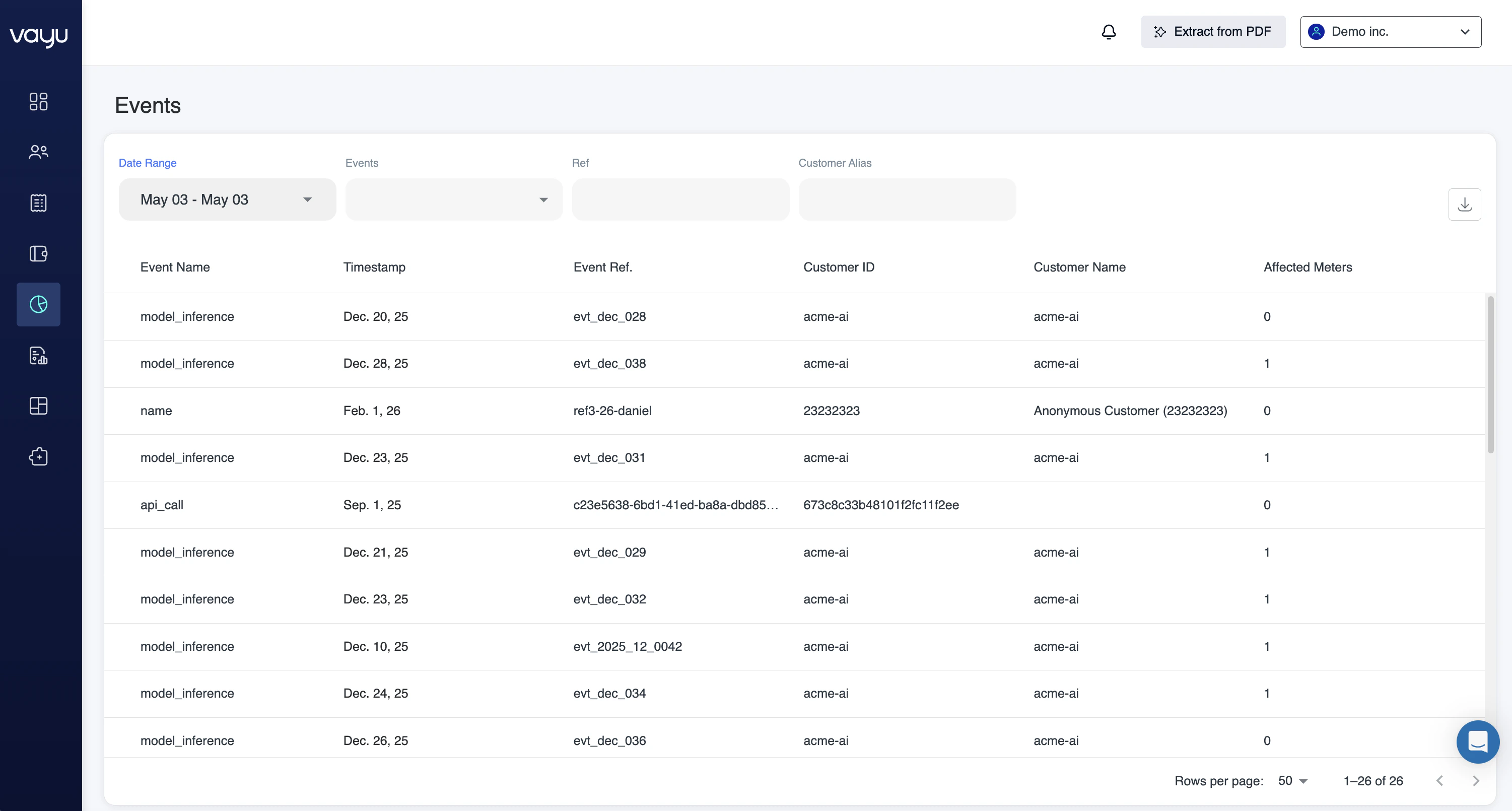
The **Data Metering — Events** section provides visibility into the raw event data for usage tracking, metering, and downstream billing calculations within Vayu. It gives teams a window to review incoming event activity, validate ingestion workflows, and monitor the underlying data that powers usage-based pricing models.
Events represent incoming activity before aggregation or billing calculations are applied. They act as the foundational data layer for usage calculations across the platform for an array of use cases like ingesting product telemetry, validating customer activity, or troubleshooting metering discrepancies.
At the top of the page, you’ll find tools for filtering and reviewing events by customer, source, product, or ingestion status. Below that, event records are displayed in a searchable operational view designed to support both metering workflows and billing validation processes.
## **Filters**
You can filter events by:
* **Date Range**
* **Events** – Filter by event name or type.
* **Ref** – Search by event reference.
* **Customer Alias** – Locate events associated with a specific customer.
These filters help isolate individual events or investigate activity patterns.
## Overview
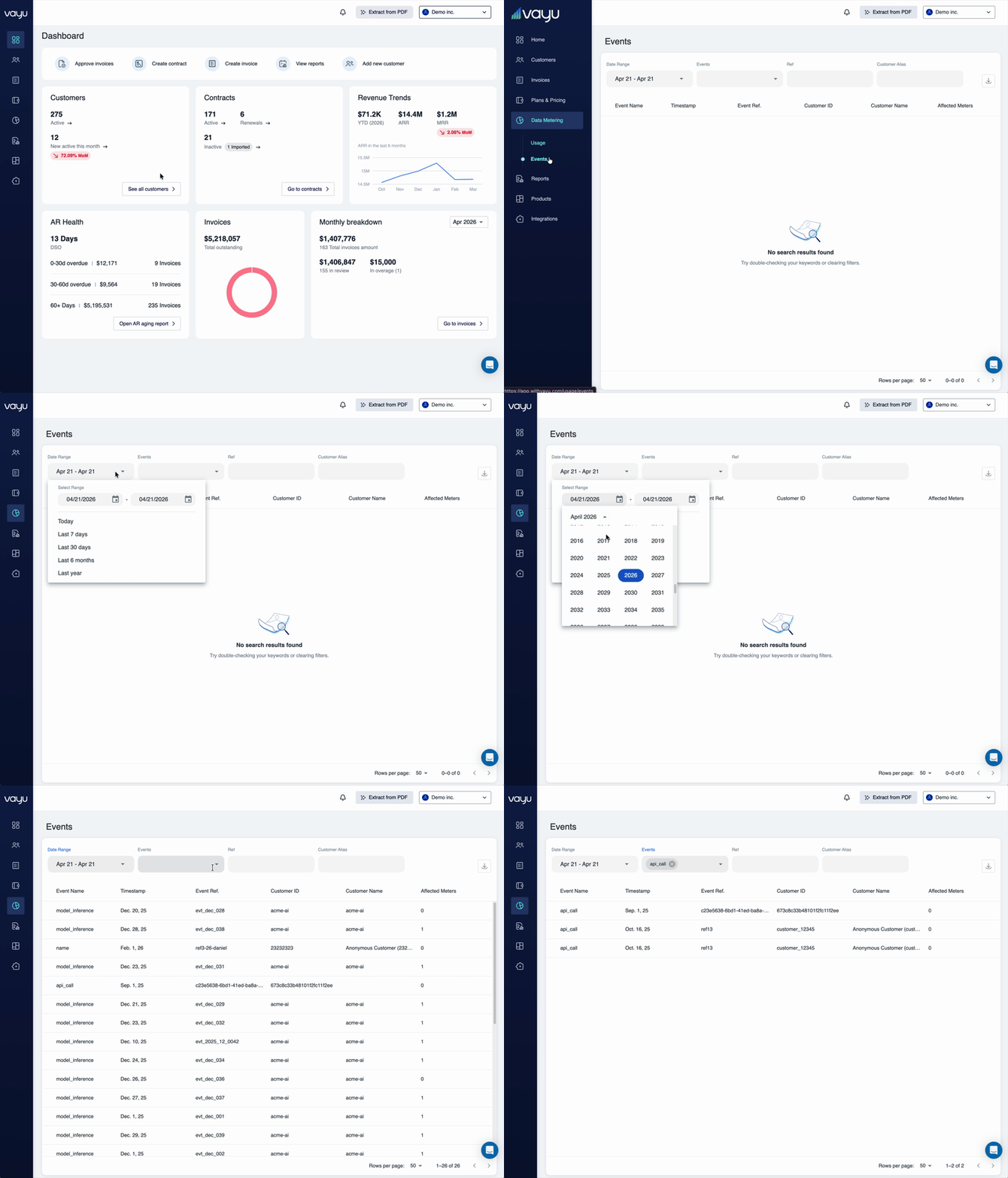
Use event search to query and filter usage events recorded in Vayu. This allows you to analyze customer activity, verify metered usage, and troubleshoot billing discrepancies.
 ***
## title: "Search Events" description: "Query and filter usage events to analyze customer activity and troubleshoot billing" icon: "magnifying-glass-arrows-rotate"
## Search Events
Use event search to query and filter usage events recorded in Vayu. This allows you to analyze customer activity, verify metered usage, and troubleshoot billing discrepancies.
### Searching events through the UI
To view events in the Vayu interface:
1. Navigate to **Usage** in the left-hand navigation
2. Click **Events**
3. View the latest 100 events recorded in the system
***
## title: "Search Events" description: "Query and filter usage events to analyze customer activity and troubleshoot billing" icon: "magnifying-glass-arrows-rotate"
## Search Events
Use event search to query and filter usage events recorded in Vayu. This allows you to analyze customer activity, verify metered usage, and troubleshoot billing discrepancies.
### Searching events through the UI
To view events in the Vayu interface:
1. Navigate to **Usage** in the left-hand navigation
2. Click **Events**
3. View the latest 100 events recorded in the system
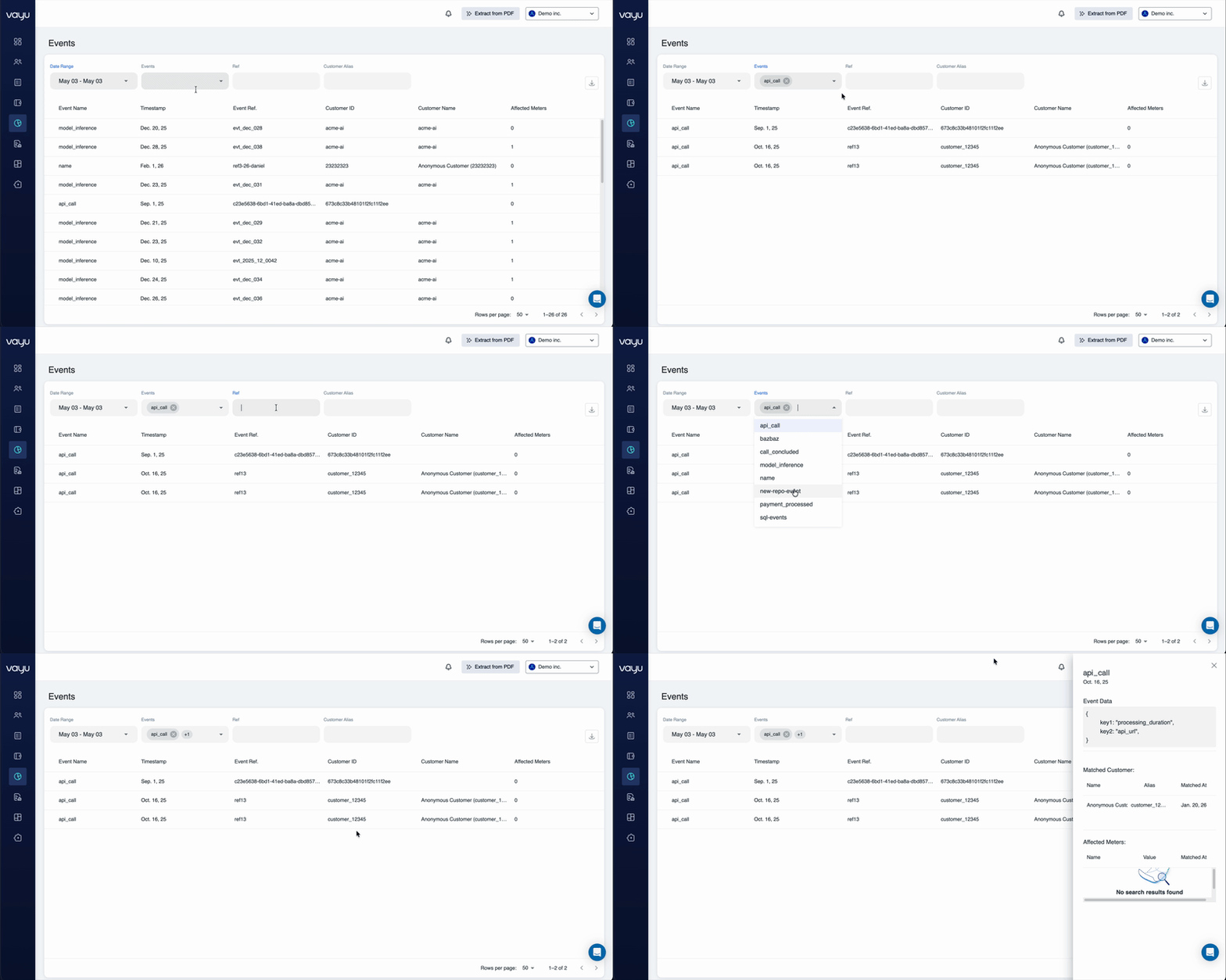 The events list displays:
* Event name
* Timestamp
* Customer alias
* Event reference ID
* Event data and properties
### Searching events through the API
For more advanced filtering and larger result sets, use the API to query events.
#### Query events endpoint
````text theme={null}
GET /events
### Query parameters Filter events using these parameters: - `startTime` - Beginning of timestamp range (ISO 8601 format) - `endTime` - End of timestamp range (ISO 8601 format) - `eventName` - Filter by specific event name (optional) - `limit` - Maximum number of results to return (default: 10) - `cursor` - Pagination cursor for retrieving additional results ### Example request ```bash GET /events?startTime=2023-11-01T00:00:00Z&endTime=2023-11-30T23:59:59Z&eventName=api_call&limit=100
````
#### **Example response**
```text theme={null}
{
"events": [
{
"name": "api_call",
"timestamp": "2023-09-13T18:25:43.511Z",
"customerAlias": "customer_12345",
"ref": "4f6cf35x-2c4y-483z-a0a9-158621f77a21",
"data": {
"key1": "processing_duration",
"key2": "api_url"
},
"id": "",
"createdAt": "2023-11-07T05:31:56Z",
"updatedAt": "2023-11-07T05:31:56Z"
}
]
}
```
## **Common search scenarios**
### **Find events for a specific customer**
Query events by customer alias and time period to see all activity for that customer:
`GET /events?startTime=2023-11-01T00:00:00Z&endTime=2023-11-30T23:59:59Z&customerAlias=customer_12345`
### **Verify usage for billing period**
Search events within a billing period to verify metered usage before invoice generation:
`GET /events?startTime=2023-10-01T00:00:00Z&endTime=2023-10-31T23:59:59Z&eventName=compute_hours`
### **Troubleshoot missing charges**
Query events by event name to identify if usage was recorded but not billed:
`GET /events?eventName=storage_gb&startTime=2023-11-01T00:00:00Z&endTime=2023-11-30T23:59:59Z`
### **Analyze usage patterns**
Retrieve large datasets to analyze usage trends and patterns:
`GET /events?startTime=2023-01-01T00:00:00Z&endTime=2023-12-31T23:59:59Z&limit=1000`
### **Event availability**
Events are immediately available after submission:
* **Real-time visibility** - Events appear instantly in both UI and API
* **No processing delay** - Query events as soon as they're recorded
* **Immediate analysis** - Monitor and act on incoming data in real-time
### **Pagination**
For large result sets, use cursor-based pagination:
1. Make initial request with `limit` parameter
2. Response includes a `cursor` value
3. Use cursor in next request to retrieve additional results
4. Continue until no more results are returned
### **Best practices**
* **Use time ranges** - Always specify startTime and endTime to limit result sets
* **Filter by event name** - Narrow results to specific event types when possible
* **Set appropriate limits** - Balance between result size and number of API calls
* **Store cursors** - Save pagination cursors to resume queries
* **Monitor in real-time** - Use event search for live monitoring and alerting
## Pricing Events
Pricing events, also called measurements, are the raw usage data points you send to Vayu to power usage-based billing. Each event represents a billable action or consumption that occurred in your product.
Pricing events are individual records of customer usage that include:
* **Event name** - The type of usage being measured (e.g., "api\_call", "storage\_gb", "seats")
* **Customer identifier** - Links the event to a specific customer
* **Timestamp** - When the usage occurred
* **Quantity** - The amount of usage (e.g., 1 API call, 50 GB storage)
* **Metadata** - Additional context like region, product tier, or feature flags
You can ingest pricing events through multiple methods:
### Ingestion
#### **API ingestion**
Send events directly to Vayu's ingestion API:
```json theme={null}
POST /events
{
"eventName": "api_call",
"customerId": "customer_123",
"timestamp": "2024-03-17T10:00:00Z",
"quantity": 1,
"metadata": {
"endpoint": "/users",
"method": "GET"
}
}
```
#### **Batch ingestion**
For high-volume scenarios, send events in batches to reduce API overhead.
#### **Data warehouse integration**
Connect your data warehouse to automatically sync usage data to Vayu on a scheduled basis.
### **Event processing**
Once ingested, pricing events flow through Vayu's processing pipeline:
1. **Validation** - Events are checked for required fields and data integrity
2. **Enrichment** - Customer and product data is attached to each event
3. **Aggregation** - Events are grouped and summed according to your pricing configuration
4. **Rating** - Aggregated usage is converted to billable amounts based on pricing tiers
5. **Invoicing** - Rated usage appears on customer invoices
#### **Event requirements**
Each pricing event must include:
* **Unique event ID** - Prevents duplicate processing (idempotency)
* **Customer identifier** - Maps to a customer in Vayu
* **Event name** - Matches a configured pricing metric
* **Timestamp** - Must be within the acceptable time window
* **Quantity** - Numeric value representing the usage amount
**Best Practices**
When sending pricing events:
* **Send events in real-time** - Minimize delay between usage and event ingestion
* **Use idempotency keys** - Prevent duplicate charges from retry logic
* **Include rich metadata** - Enable detailed usage analysis and debugging
* **Batch when appropriate** - Balance real-time visibility with API efficiency
* **Monitor ingestion** - Track event delivery and processing errors
* **Test thoroughly** - Verify events are correctly mapped to pricing metrics
### **Viewing Pricing Events**
You can view ingested pricing events in the Vayu dashboard:
1. Navigate to **Usage Data**
2. Select **Events** or **Measurements**
3. Filter by customer, date range, or event type
4. Review event details and processing status
This visibility helps you troubleshoot billing issues and verify usage data accuracy.
The events list displays:
* Event name
* Timestamp
* Customer alias
* Event reference ID
* Event data and properties
### Searching events through the API
For more advanced filtering and larger result sets, use the API to query events.
#### Query events endpoint
````text theme={null}
GET /events
### Query parameters Filter events using these parameters: - `startTime` - Beginning of timestamp range (ISO 8601 format) - `endTime` - End of timestamp range (ISO 8601 format) - `eventName` - Filter by specific event name (optional) - `limit` - Maximum number of results to return (default: 10) - `cursor` - Pagination cursor for retrieving additional results ### Example request ```bash GET /events?startTime=2023-11-01T00:00:00Z&endTime=2023-11-30T23:59:59Z&eventName=api_call&limit=100
````
#### **Example response**
```text theme={null}
{
"events": [
{
"name": "api_call",
"timestamp": "2023-09-13T18:25:43.511Z",
"customerAlias": "customer_12345",
"ref": "4f6cf35x-2c4y-483z-a0a9-158621f77a21",
"data": {
"key1": "processing_duration",
"key2": "api_url"
},
"id": "",
"createdAt": "2023-11-07T05:31:56Z",
"updatedAt": "2023-11-07T05:31:56Z"
}
]
}
```
## **Common search scenarios**
### **Find events for a specific customer**
Query events by customer alias and time period to see all activity for that customer:
`GET /events?startTime=2023-11-01T00:00:00Z&endTime=2023-11-30T23:59:59Z&customerAlias=customer_12345`
### **Verify usage for billing period**
Search events within a billing period to verify metered usage before invoice generation:
`GET /events?startTime=2023-10-01T00:00:00Z&endTime=2023-10-31T23:59:59Z&eventName=compute_hours`
### **Troubleshoot missing charges**
Query events by event name to identify if usage was recorded but not billed:
`GET /events?eventName=storage_gb&startTime=2023-11-01T00:00:00Z&endTime=2023-11-30T23:59:59Z`
### **Analyze usage patterns**
Retrieve large datasets to analyze usage trends and patterns:
`GET /events?startTime=2023-01-01T00:00:00Z&endTime=2023-12-31T23:59:59Z&limit=1000`
### **Event availability**
Events are immediately available after submission:
* **Real-time visibility** - Events appear instantly in both UI and API
* **No processing delay** - Query events as soon as they're recorded
* **Immediate analysis** - Monitor and act on incoming data in real-time
### **Pagination**
For large result sets, use cursor-based pagination:
1. Make initial request with `limit` parameter
2. Response includes a `cursor` value
3. Use cursor in next request to retrieve additional results
4. Continue until no more results are returned
### **Best practices**
* **Use time ranges** - Always specify startTime and endTime to limit result sets
* **Filter by event name** - Narrow results to specific event types when possible
* **Set appropriate limits** - Balance between result size and number of API calls
* **Store cursors** - Save pagination cursors to resume queries
* **Monitor in real-time** - Use event search for live monitoring and alerting
## Pricing Events
Pricing events, also called measurements, are the raw usage data points you send to Vayu to power usage-based billing. Each event represents a billable action or consumption that occurred in your product.
Pricing events are individual records of customer usage that include:
* **Event name** - The type of usage being measured (e.g., "api\_call", "storage\_gb", "seats")
* **Customer identifier** - Links the event to a specific customer
* **Timestamp** - When the usage occurred
* **Quantity** - The amount of usage (e.g., 1 API call, 50 GB storage)
* **Metadata** - Additional context like region, product tier, or feature flags
You can ingest pricing events through multiple methods:
### Ingestion
#### **API ingestion**
Send events directly to Vayu's ingestion API:
```json theme={null}
POST /events
{
"eventName": "api_call",
"customerId": "customer_123",
"timestamp": "2024-03-17T10:00:00Z",
"quantity": 1,
"metadata": {
"endpoint": "/users",
"method": "GET"
}
}
```
#### **Batch ingestion**
For high-volume scenarios, send events in batches to reduce API overhead.
#### **Data warehouse integration**
Connect your data warehouse to automatically sync usage data to Vayu on a scheduled basis.
### **Event processing**
Once ingested, pricing events flow through Vayu's processing pipeline:
1. **Validation** - Events are checked for required fields and data integrity
2. **Enrichment** - Customer and product data is attached to each event
3. **Aggregation** - Events are grouped and summed according to your pricing configuration
4. **Rating** - Aggregated usage is converted to billable amounts based on pricing tiers
5. **Invoicing** - Rated usage appears on customer invoices
#### **Event requirements**
Each pricing event must include:
* **Unique event ID** - Prevents duplicate processing (idempotency)
* **Customer identifier** - Maps to a customer in Vayu
* **Event name** - Matches a configured pricing metric
* **Timestamp** - Must be within the acceptable time window
* **Quantity** - Numeric value representing the usage amount
**Best Practices**
When sending pricing events:
* **Send events in real-time** - Minimize delay between usage and event ingestion
* **Use idempotency keys** - Prevent duplicate charges from retry logic
* **Include rich metadata** - Enable detailed usage analysis and debugging
* **Batch when appropriate** - Balance real-time visibility with API efficiency
* **Monitor ingestion** - Track event delivery and processing errors
* **Test thoroughly** - Verify events are correctly mapped to pricing metrics
### **Viewing Pricing Events**
You can view ingested pricing events in the Vayu dashboard:
1. Navigate to **Usage Data**
2. Select **Events** or **Measurements**
3. Filter by customer, date range, or event type
4. Review event details and processing status
This visibility helps you troubleshoot billing issues and verify usage data accuracy.